How to close the Funbridge app once and for all when it is not responding anymore?
- Download
- Account creation and email address certification
- What are the system requirements to install Funbridge?
- Updating your Apple products
- Updating your Android products
- How to close the Funbridge app once and for all when it is not responding anymore?
On Mac:

On iPhone, iPad, iPod Touch:

On Android smartphones and tablets:
Step 1: Go to your device settings (from the home screen or from the app list)
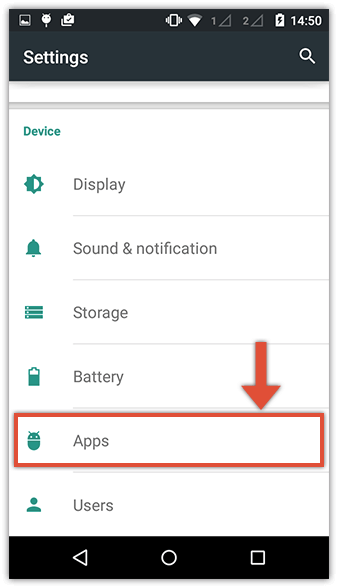
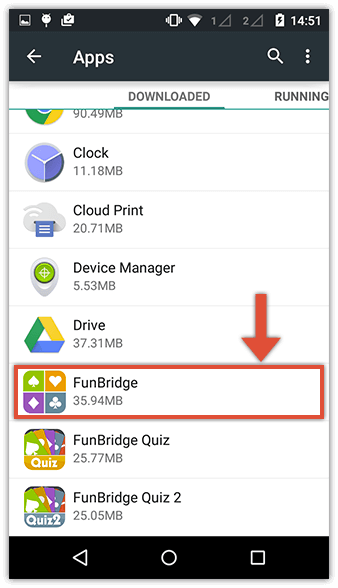
Step 2: In « Apps », select « Funbridge » in the list
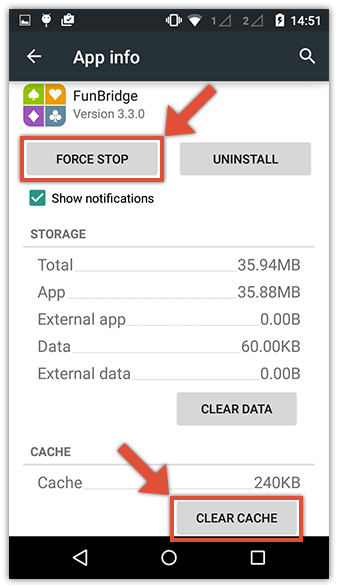
Step 3: Click the « Force stop » button (optional: click the « clear cache » button) and confirm.
Close and relaunch Funbridge from the app list.