Updating your Android products
NB1: When you will update your Android device, you won't lose your information, contacts or pictures.
An update only impoves your interface.
NB2: The operation was done using a LG Nexus 5. The operation is almost the same for other Android devices.
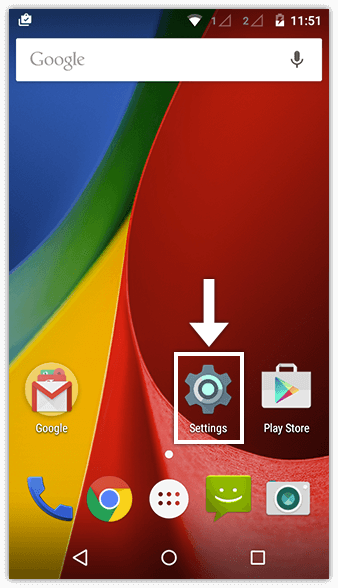
Step 1: Go to your device settings.
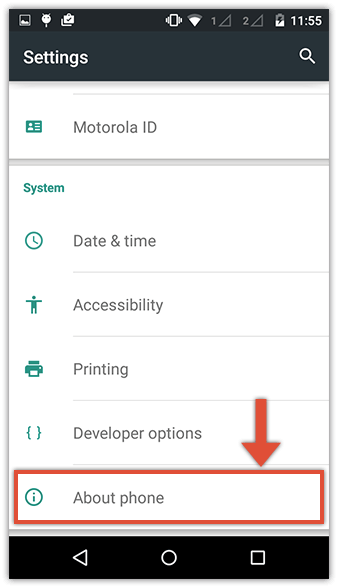
Step 2: Click on "About the device".
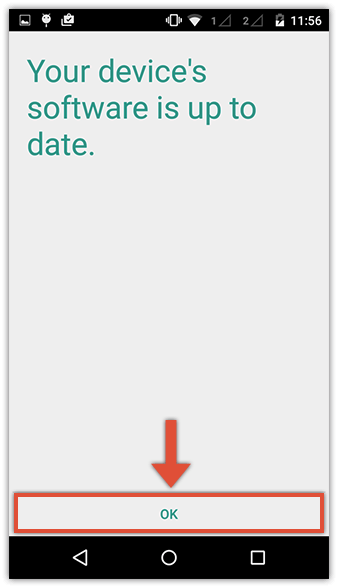
Step 3: Click on "System updates" to search any update available for your device.
However, you may not have access to the most recent updates. Indeed, it depends on the manufacturer and the model of your device, even on your operator itself.
NB2: The operation was done using a LG Nexus 5. The operation is almost the same for other Android devices.
Step 1: Go to your device settings.
Step 2: Click on "About the device".
Step 3: Click on "System updates" to search any update available for your device.
However, you may not have access to the most recent updates. Indeed, it depends on the manufacturer and the model of your device, even on your operator itself.
